JK BMS Parallel Batteries: Wiring, DIP Addresses and Settings
A home storage bank often grows from one 48 V pack to two, three or more. With JK inverter BMS boards (the PB series, for example JK-PB2A16S20P) that works well, but three things have to be right: the power wiring, the communication link between the packs and the settings on every BMS. Each pack keeps its own BMS. One of them becomes the master: it collects the data of the whole bank and talks to the inverter.
Before you connect anything
Parallel packs share one voltage the moment the busbars close, so prepare them first.
- Same chemistry and cell count. A 16S LFP pack does not go in parallel with a 15S pack or an NMC pack.
- Similar capacity. Mixing 280 Ah and 314 Ah packs works, but they do not share current evenly. Identical packs make life easier.
- Equal voltage. Charge each pack to full on its own, or bring the pack voltages within about 0.1 V of each other. A bigger gap makes a large current flow from one pack into the other when you connect them.
The PB board has a current limiter for this moment. When a charge overcurrent or a charge short circuit is detected, it limits the current to 10 A instead of cutting it, so packs at slightly different voltages can level out. It only works when Disable PCL is off. See the OCP and SCP guide for the related settings.
Power wiring
Connect plus to plus and minus to minus. Every pack gets its own fuse or DC breaker on the positive lead, sized for that pack's BMS rating.
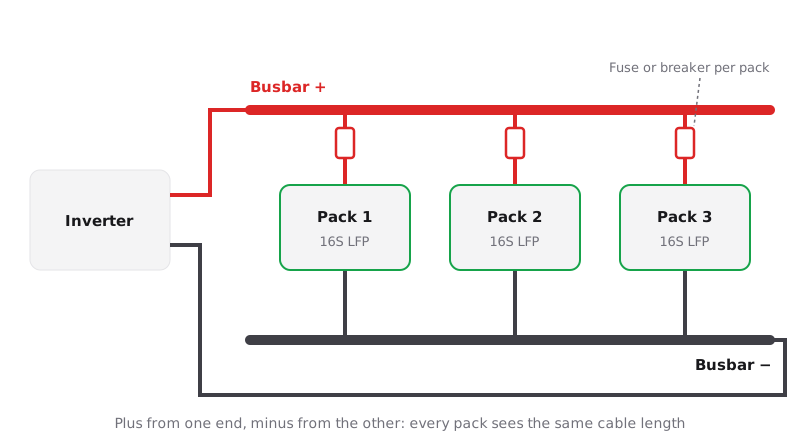
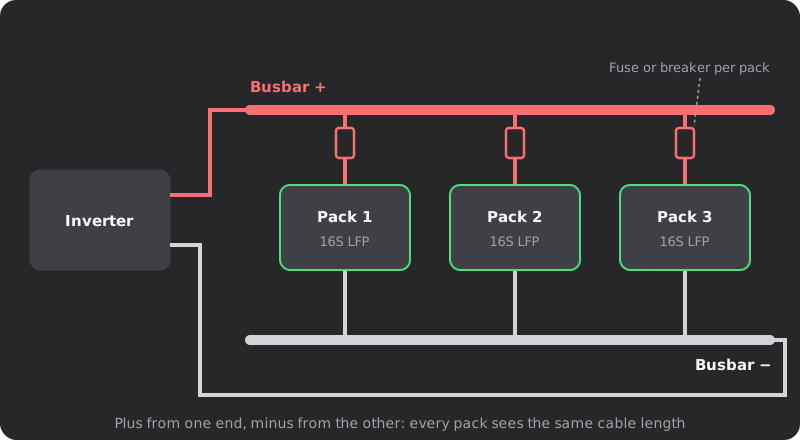
Two rules keep the packs sharing current evenly:
- Equal cable lengths. Use the same cable size and length from every pack to the busbars. A shorter cable has lower resistance, so that pack works harder.
- Take power from opposite ends. Connect the inverter positive at one end of the positive busbar and the inverter negative at the far end of the negative busbar. Every pack then sees the same total cable length. Chaining packs terminal to terminal and taking both inverter cables from the first pack makes that first pack carry most of the load.
The communication link
The PB adapter board has a CAN socket, RS485-1, RS232 and a double RS485-2 socket. RS485-2 is the parallel link. Run a network cable from RS485-2 of the master to RS485-2 of the next pack, then from that pack's second RS485-2 socket to the next one, and so on. Only the master connects to the inverter, over CAN or RS485-1, as described in the inverter communication guide.
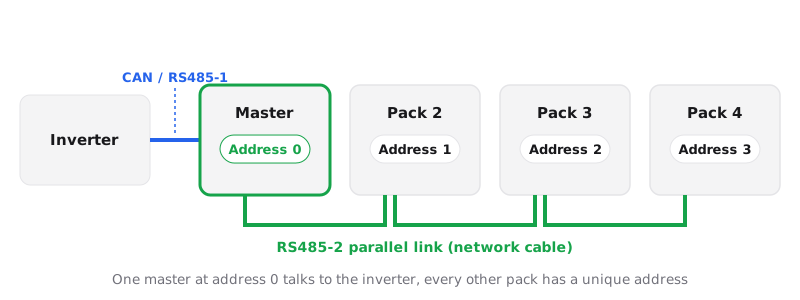
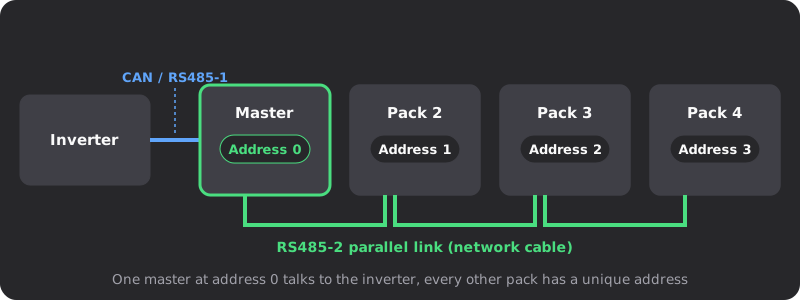
When the link works, the Link LED on the master and on each slave flashes. If it stays dark on one pack, check that pack's cable and address first.
DIP switch addresses
The four DIP switches marked ADD set the pack address. According to JK's PB manual, switches 1, 2, 3 and 4 are worth 1, 2, 4 and 8. Add the values of the switches set to ON to get the address.
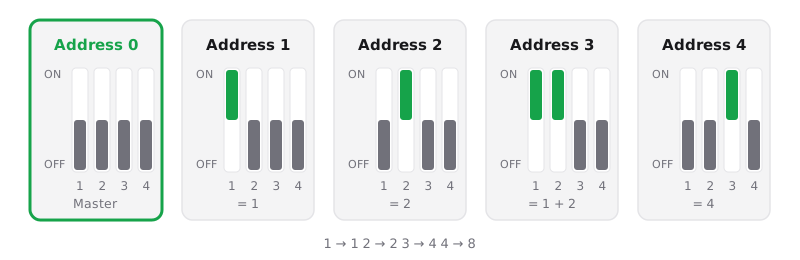
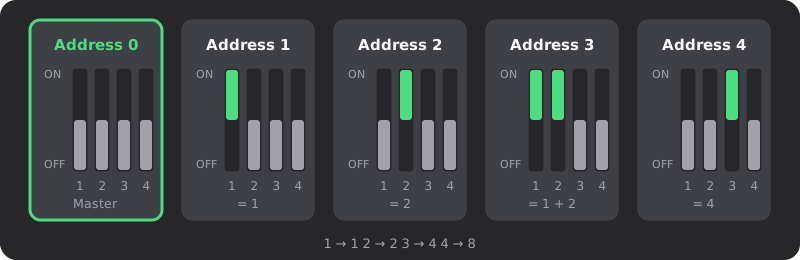
- Exactly one pack has address 0. It is the master.
- Every other pack gets a unique address from 1 to 15. Two packs with the same address fight on the link.
- The four switches give 16 addresses, so a bank can hold up to 16 packs. Your inverter may support fewer.
- The BMS reads the address at start-up. Change the switches with the BMS off, or press RST afterwards.
Settings on every pack
Each BMS protects only its own pack, so give every pack the same protection values. If one pack has a lower cell OVP, it trips first, and the rest of the bank suddenly takes all the charge current.
- Same voltage thresholds: cell OVP and UVP with their recovery values, SOC-100% and SOC-0% voltages, balance start and trigger. The parameters reference explains each one.
- Own capacity: set Battery capacity to that pack's capacity, not the total of the bank.
- Same current limits on every pack.
- Protocol settings on the master only. The slaves do not talk to the inverter.
The easiest way is to connect to each pack in turn in the browser editor, apply the same preset and write it back. Save a .jkcfg backup of every pack while you are at it; the export and import guide shows how.
Current limits for the whole bank
Packs never share current perfectly, and a pack can drop out on a protection while the others keep working. Plan for that.
- Set the inverter's maximum charge and discharge current so that the bank survives one pack dropping out. Three 200 A packs should not be asked for 600 A; around 400 A leaves room for one pack to switch off.
- Keep each pack's charge current limit at or below what its cells allow, even when the bank total looks large.
- Check the current of every pack now and then. A pack that always carries much more than the others points to a cable, a fuse or a connection with higher resistance somewhere else.
Troubleshooting
The inverter only sees one pack. What is wrong?
The slaves are not reaching the master. Check the RS485-2 cables, look for two packs with the same address and make sure exactly one pack is at address 0. Watch the Link LEDs while you do.
One pack never charges. Why?
Read its alarms. A pack whose charge MOS is off because of a protection simply sits out while the others charge. The alarms list shows which setting governs each alarm.
Can I mix a PB pack with a B2A pack?
On the power side, yes, if voltage and chemistry match. The B2A board has no RS485-2 link, so the master cannot see that pack and the inverter does not count it.
Do I need address 0 for a single pack?
Most inverter setups expect address 0 for the pack that talks to the inverter. JK's firmware update also needs a non-zero address with the pack disconnected from the master, so set it back to 0 afterwards.
Related guides
- JK Inverter BMS Communication: Deye, Victron and Growatt SetupConnect a JK inverter BMS to Deye, Victron or Growatt over CAN or RS485: protocol number, port mode, DIP address, cable pinout and the inverter-side settings.
- JK BMS Model Numbers Explained: B2A8S20P, PB2A16S20P and MoreDecode any JK BMS model name: series, balance current, cell count and current rating, plus the -H, -HC and -R suffixes and what they mean for heating, CAN and RS485.
- JK BMS Overcurrent Protection Settings: OCP and SCP GuideJK BMS overcurrent protection settings explained: charge and discharge OCP limits, delays, recovery times and SCP, with ranges and sizing for inverters.
- Export and Import JK BMS Settings: The .jkcfg File GuideHow to export and import JK BMS settings with the app, what the .jkcfg file contains, why hand edits break it, and how to edit it safely in your browser.