JK BMS Wiring Diagram: 8S and 16S Balance Leads and Connection Order
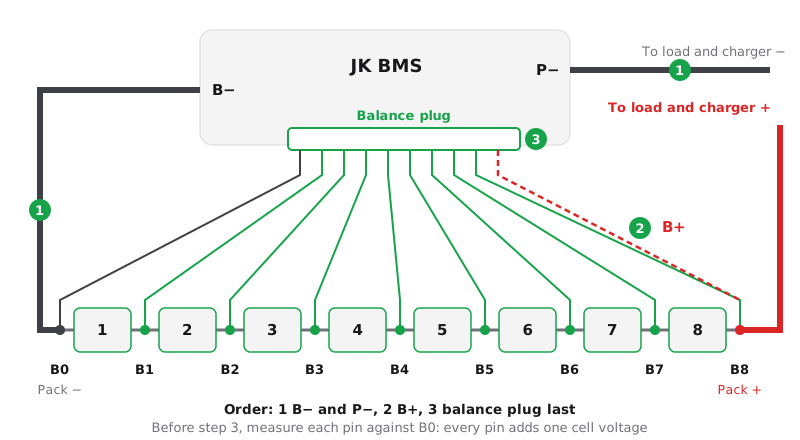
A JK BMS is wired with two thick leads and one balance harness. B- goes to the pack negative, P- goes to the negative of the load and the charger, and B+ feeds the board from the pack positive. In the balance harness, B0 sits on the pack negative and B1 to Bn sit on the positive of cell 1 to cell n. Connect the thick leads first and plug the balance harness into the BMS last, after you have measured every pin with a multimeter.
The leads on a JK BMS
- B- connects to the total negative of the pack, the negative terminal of cell 1.
- P- (C- on some older boards) is the negative of the load and the charger. Charging and discharging share this port. The pack positive goes straight to the load and the charger, because the BMS switches the negative side.
- B+ supplies the board. On B-series boards such as the JK-B2A8S20P it is the last pin of the balance plug, listed in the manual as the BMS power supply with a 10 to 40 V range. On inverter boards such as the JK-PB2A16S20P it is a separate cable (16 AWG in the kit) to the total positive of the pack.
- Balance leads carry each cell voltage to the board and the balance current back. B0 goes on the negative of cell 1, B1 on the positive of cell 1, B2 on the positive of cell 2, and so on. Each lead lands on the busbar between two cells, and the top lead on the pack positive.
Board type and inverter type
| JK-B2A8S20P (board type) | JK-PB2A16S20P (inverter type) | |
|---|---|---|
| Cells | 4 to 8 LiFePO4 per the manual | 16 per the manual |
| Thick leads | B- and P- | B- and P-, plus a B+ cable |
| Balance harness | One 10-pin plug: B0 to B8 and B+ | Two 7-pin and two 6-pin cables: B0 to B16 and probe pins |
| Switching on | A charger at least 5 V above the pack | A short press of the power button |
The inverter type also has RS485 and CAN ports for the inverter. The model number guide decodes the names. Revisions differ, so check the manual that came with your unit.
The connection order and why it matters
The JK inverter BMS manual says the board has strict power-on sequence requirements:
- Connect B-, then P-, then B+ (and P+ where the board has one).
- Plug in the balance connectors from low to high, the one with B0 and cell 1 first.
- Press the button to activate the board.
- Connect the load or the charger only after all wiring is in place.
To remove the BMS, reverse the order. The B-series manual says the same in other words: connect from the negative pole to the positive pole, check the balance leads again with a meter, and only then insert the plug.
The reason is protection of the measuring circuit. Each balance input is built for one cell voltage against its neighbour, with B- as the reference. Without that reference, or with a lead on the wrong busbar, an input can see several cells at once. That can damage the measuring or balancing circuit, and the board then reads wrong cells or does not start.
Measure before you plug in
With the harness fitted to the cells but not plugged into the BMS, put the black probe on B0 and touch every pin in turn. A LiFePO4 pack at rest climbs by about 3.3 V per pin: B1 about 3.3 V, B2 about 6.6 V, up to about 26.4 V on B8 of an 8S pack. A jump of two cells, the same value twice or a negative reading means a lead sits on the wrong busbar. Fix it before the plug goes in.
8S packs and spare harness wires
On an 8S board with eight cells every lead is used: B0 on the pack negative, B1 to B8 on the cells, and B+ on the pack positive together with B8.
When the harness has more leads than your pack has cells, for example an 8S board on 4 cells or a 24S board on 16 cells, JK draws a separate wiring diagram for every cell count. In the diagrams we checked, the spare leads are not stacked on the next cells: the 24S manual marks the unused middle leads as not connected, and the top lead goes to the pack positive with the last cell lead and B+. Copy the diagram for your exact model and cell count. Never leave the ends of spare leads bare: insulate each one on its own.
The JK-PB2A16S20P manual lists 16 as its supported cell count. For an 8S pack, choose a board that lists 8S, such as the JK-B2A8S20P, or check that your manual covers 8 cells.
Cell count and temperature sensors
After the first start, set the cell count to your exact series count. The JK manual says the board will not work properly until it matches. Use the JK app or JK Preset Studio in the browser, which reads the BMS over Bluetooth, applies a preset and writes it back with a check. The first setup guide covers the rest.
Tape the temperature probes to the cells, not to a busbar or the BMS heatsink. The 8S board manual defines two probe sockets, and the inverter board has several NTC inputs, one of them in the balance harness. A missing or broken probe raises a temperature sensor alarm, see the alarm list.
What goes wrong
| Symptom | Likely cause | Fix |
|---|---|---|
| Cell count does not match the settings | Wrong cell count, or a loose or missing balance lead | Set the cell count, then measure every pin against B0 |
| One cell reads 0 V and the next reads double | Two leads swapped or one lead on the wrong busbar | Unplug the harness, find the lead with the meter, move it |
| Wire resistance warning, balancing does not start | Poor crimp, loose lug or a wrong connection | Check that lead, see wire resistance |
| BMS does not start after plugging in | B+ missing, wrong order, or damage from a swapped lead | Check B+ and the order; do not keep replugging a suspect harness |
Safety
- Use insulated tools and take off rings and watches.
- Connect one lead at a time and tape every loose lug until it is fastened.
- Put a fuse or breaker in the positive lead close to the pack, rated for your cable and the BMS current.
FAQ
In which order do you connect a JK BMS?
Connect B- first, then P-, then B+, and plug the balance connectors in last, from low to high. Connect the load and the charger only after everything else is in place.
Where does B0 go on a JK BMS?
B0 goes on the negative terminal of cell 1, which is the total negative of the pack. B1 then goes on the positive of cell 1, and each next lead goes one cell higher.
Can I use a 16S JK BMS on an 8S battery?
Only if the manual of that model lists 8S. The JK-PB2A16S20P manual lists 16 cells, so an 8S pack usually takes an 8S board such as the JK-B2A8S20P.
How do I connect several JK BMS packs in parallel?
Each pack keeps its own BMS, and the packs meet on common busbars with a fuse per pack. See the parallel batteries guide.
Connect your BMS once it is wired and set the cell count, capacity and chemistry with a verified write.
Related guides
- How to Set Up a New JK BMS: First Start Step by StepSet up a new JK BMS the right way: wiring order, first power-on, passwords, cell count, a chemistry preset, current limits and a verified write over Bluetooth.
- JK BMS Balance Wire Resistance: Fix the Abnormal Resistance AlarmJK BMS balance wire resistance (cell wire resistance): what the Abnormal resistance of the balance wire alarm means, normal values and how to fix a bad lead.
- JK BMS Parallel Batteries: Wiring, DIP Addresses and SettingsConnect several JK inverter BMS packs in parallel: busbar wiring, the RS485-2 link, DIP switch addresses, the master pack, matching settings and current limits.
- JK BMS Model Numbers Explained: B2A8S20P, PB2A16S20P and MoreDecode any JK BMS model name: series, balance current, cell count and current rating, plus the -H, -HC and -R suffixes and what they mean for heating, CAN and RS485.